
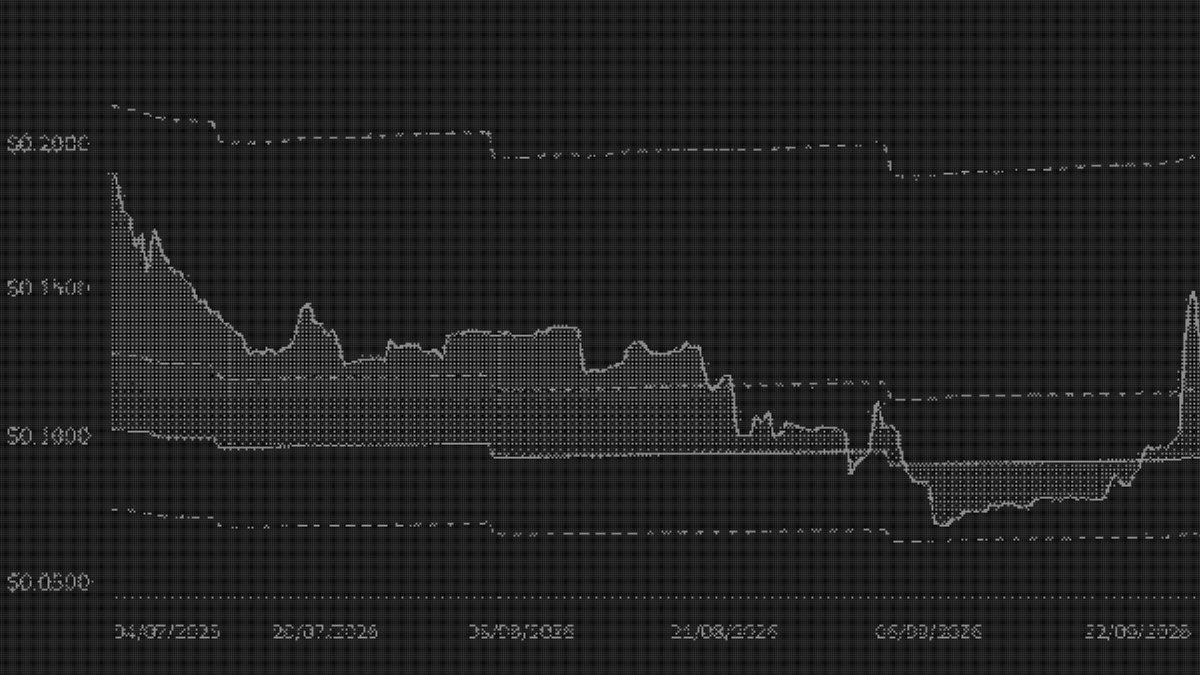
We’ve made significant improvements to 01Resolved to make it easier to understand what you own. You can now compare price with treasury backing over time, track operating performance, explore holders and their wallet activity, better analyze revenue, and inspect the calculations behind the financials.
The updates empower investors with more data to analyze an ownership coin. Here’s what’s changed and how to use it.
Price and NAV over time
The overview chart now brings token price and NAV per adjusted supply, or NAV/AS, together with decision markets, historical premium and discount ranges, and projected monthly allowance draws. NAV/AS measures the treasury backing per live token, making it the relevant comparison for token price.
Use the Layers menu or legend to choose what appears on the chart. You can inspect when price moved above or below NAV/AS, compare the premium or discount with its historical high, low and mean, or look at price movements around a decision market.
For example, a token’s price can stay flat while its premium increases because NAV/AS has fallen. The chart makes that change visible. You can also turn on projected NAV/AS to see how scheduled allowance draws would reduce per-token backing if other inputs stayed unchanged. This is an allowance-based projection, rather than a forecast of the business’s performance.
Operating performance beside the financials
Overview pages now include operating metrics specific to each business. These can include total users, daily active users, volume and transactions, with changes against the prior 30 days where comparable history is available.
Select a metric to chart it over time, then use Compare to add a second metric. On P2P Protocol’s page, for example, compare protocol volume with transaction count to see whether growth comes from more transactions or larger transaction sizes. You can also compare total users with daily active users to see whether growth in the user base is accompanied by greater daily usage.
This adds context to treasury analysis. If NAV is falling as the team builds, operating metrics help holders assess what that spending is producing. Coverage is still being added by team, and we’ll announce further charts as they become available.
Who holds the token
The new holders table shows the largest wallets for each ownership coin, with labels for known accounts. You can search for a wallet and sort by balance, rank or concentration.
The two percentage columns answer different questions. % of Wallet shows the token’s share of that wallet’s tracked asset value. % of Supply shows the share of total token supply held by the wallet.
For example, a wallet could hold 2% of a token’s supply while that position represents only 5% of its portfolio. Another wallet could hold 0.1% of supply but have 80% of its tracked value in that token. One has a larger position in the project, while the other has greater portfolio concentration. Known account labels also help distinguish treasury or liquidity accounts from other holders.
Follow a wallet across the ecosystem
Select a wallet to explore its Holdings, Decision Markets and ICO participation. The profile shows its tracked asset allocation between ownership coins and other assets, while individual holdings expand into activity over time.
For example, open a large holder’s profile and expand a token position to inspect its acquisitions, reductions and holder rank. In Decision Markets, examine which proposals the wallet traded and its alignment in each market. The ICO tab lets you check its contributions and allocations, then compare them with its current holdings.
These views provide a history of the wallet’s participation. A single balance cannot tell you whether a position came from an ICO allocation or later accumulation.
Sign in to explore wallet profiles and holders beyond the public top ten. An account also unlocks the overview chart’s three month and full-history ranges.
A clearer team performance package
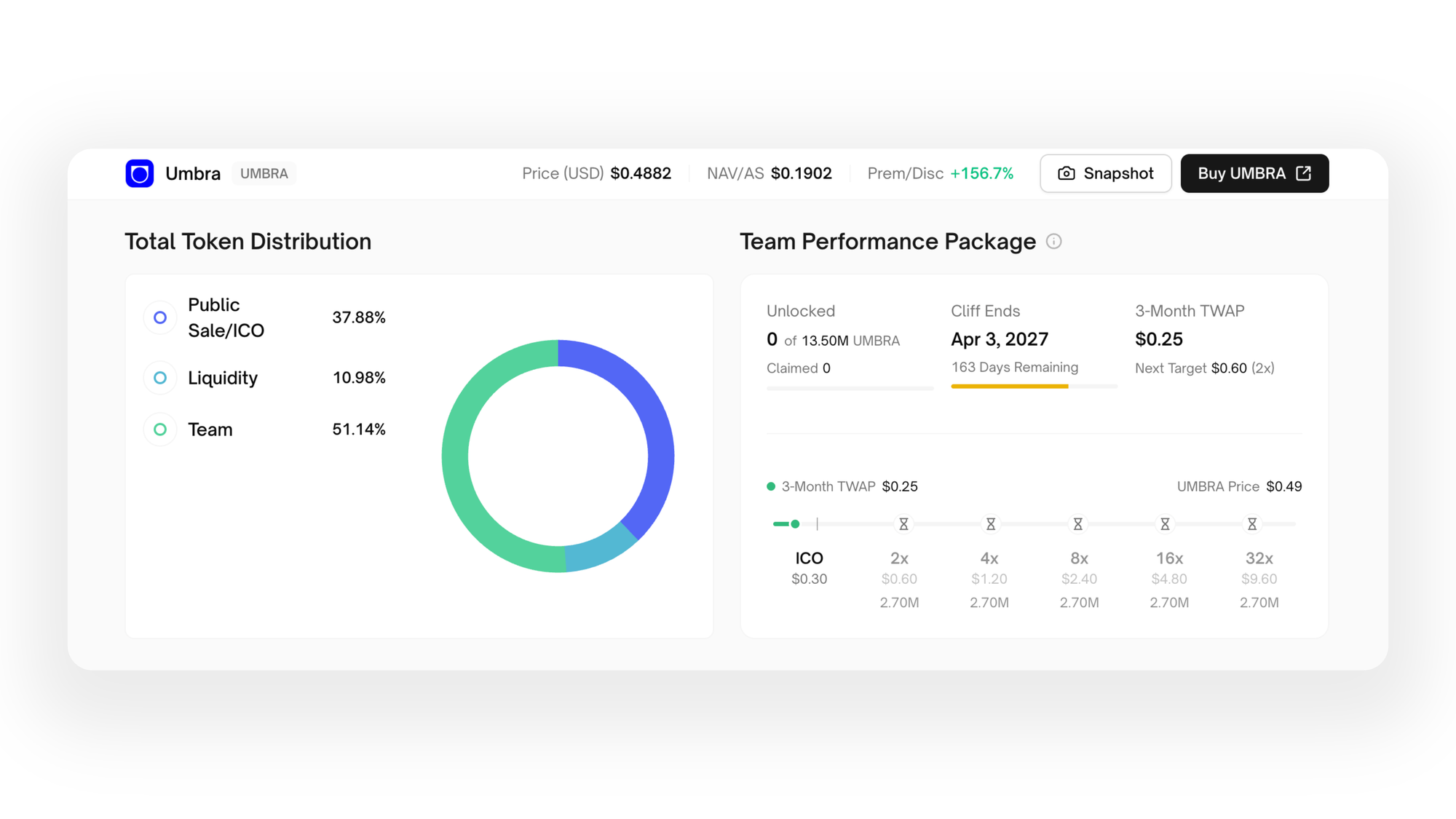
The team performance package chart now shows what has unlocked, when the cliff ends, the three month time-weighted average price, or TWAP, and the next price target. Team-specific amendments appear where applicable.
Umbra’s team performance package contains 13.5M UMBRA across five tranches. The first tranche of 2.7M tokens requires a three month TWAP of $0.60, twice its $0.30 ICO price, and the cliff ends on April 3, 2027. As of October 23, its three month TWAP is approximately $0.25 and the entire package remains locked. Use the chart to track progress toward both conditions. A brief price move above $0.60 would not satisfy the TWAP requirement, and meeting the price condition would still leave the tokens locked until the cliff ends.
The chart lets holders follow progress toward those conditions and distinguish unlocked tokens from tokens the team has already claimed.
Inspect the financial calculations
On the Financials page, NAV, NAV/AS and Monthly Allowance now open into detailed breakdowns. You can inspect the snapshot time, treasury wallets counted toward NAV, excluded assets and the supply adjustments used to calculate NAV/AS.
For example, Laso Finance’s October 22 snapshot shows approximately $933K of NAV divided by 10.4M tokens in adjusted supply, giving a NAV/AS of $0.0897. Open the breakdown to see how its 30M total supply is adjusted, including the exclusion of 17.1M tokens in the team performance package. Expand its FutarchyAMM position to see the approximately $232K of USDC counted toward NAV and the LASO tokens excluded from treasury backing.
Open Monthly Allowance to check the period’s limit, how much has been drawn and when it renews. If a team has drawn $60K of a $100K allowance, that records a draw against its funding limit. Actual operating expenses are a separate question.
Revenue and expenses over time
The updated revenue and expense charts make it easier to follow what a project earns and spends. Choose a date range, switch between daily, weekly and monthly intervals, or use the cumulative view to track totals building over time. Each chart shows the selected period’s total, its change against the preceding period and the all-time figure.
For example, MetaDAO recorded approximately $242K in protocol fee revenue in July, $199K in August and $177K in September. Use Snapshot to share the chart and selected period.
We are working with teams to collect accurate revenues and expense data using OpenBooks.
What’s next
We’re continuing work on decision market pages, ownership rights and how value reaches the token for each business, and updates to OpenBooks. We'll also have plans launching soon for anyone who wants API and MCP access to all of 01Resolved's data.
Explore the updates: 01Resolved.